Sending SMS from ChronosCodex
Texting from your own number: one-to-one conversations, campaigns, and the guardrails that keep you compliant.
Your number, your threads
Tenant workspaces text from their own assigned number (see Phone → My Numbers). Replies come back into your workspace: they land on the right household's timeline and in your SMS threads, not in a shared inbox somewhere else.
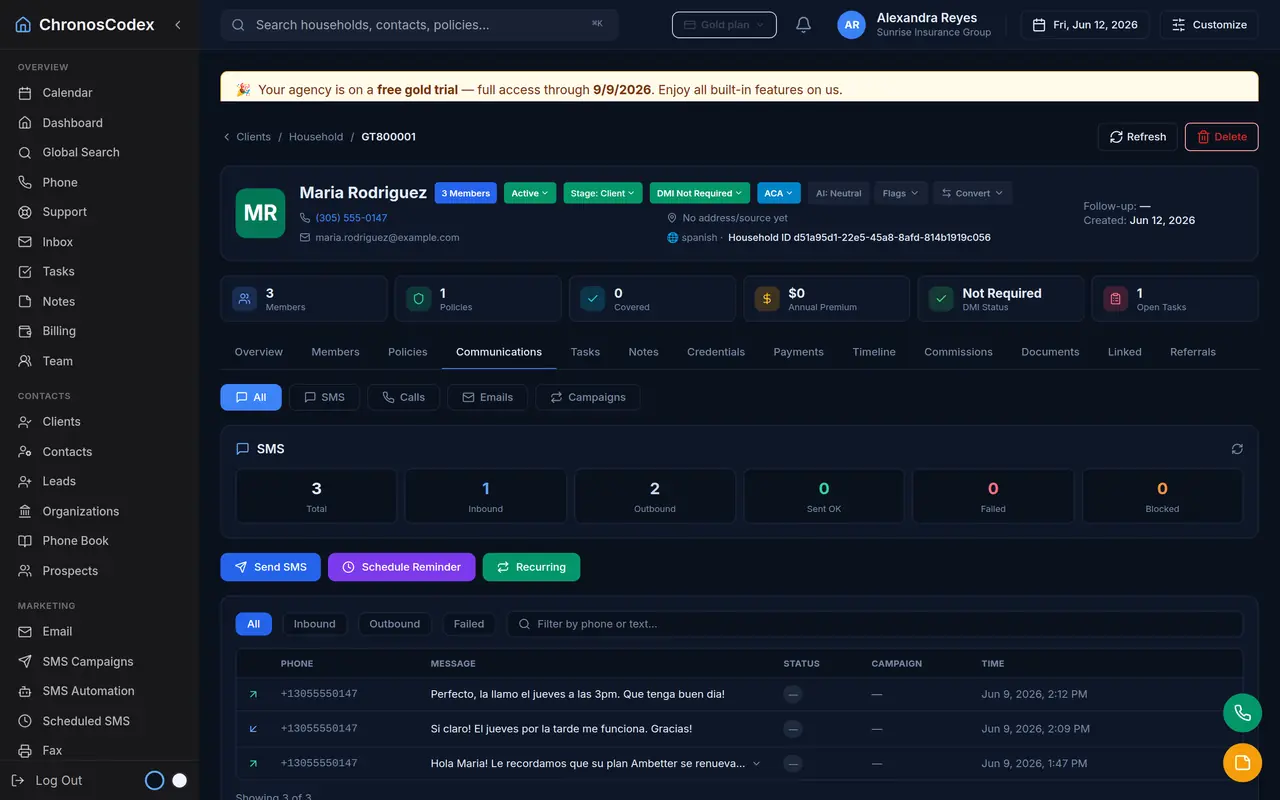
One-to-one texting
From any household, open the conversation panel and text the client directly. The thread shows both directions with timestamps. Incoming texts from numbers that match a member's phone are attached to that household automatically.
Campaigns
SMS campaigns let you message a filtered audience, for example, clients whose plans renew next month. Campaigns support templates with placeholders (the client's name fills in automatically), scheduling, and daily throttles so a big list goes out at a polite pace.
The guardrails (built in, not optional)
- Opt-outs: STOP replies block the channel immediately and permanently until the client opts back in.
- Send windows: marketing messages respect quiet hours and weekends.
- Velocity limits: circuit-breakers prevent a misconfigured loop from over-texting anyone.
- Daily caps: category-level ceilings keep volume reasonable for carriers and regulators.
Plan limits
Each tier includes a monthly SMS allowance; beyond it, messages bill from your Credits balance (see Billing). The Billing page shows usage in real time.
Ready to put this to work? Launch ChronosCodex and follow along in your own workspace, or learn about the platform if you don't have one yet.